
Network design for AI agents
Deploying AI agents safely on the network
08/27/2026

Something I have been bullish on for several years is running AI workloads at the edge. Low power inference devices in a distributed office environment. In the case of Origin it would be our clinics. Our initial experiments were on Mac Mini hardware (M4 Pro 64GB) running a home-rolled LLM runner on Metal with an orchestration layer we built. Performance isn't quite fast enough for interactive workloads but great for batch work.
Now in 2026 we have more options for edge hardware including the Apple's latest M6 Macs, Nvidia DGX Spark systems and the AMD Strix Halo platform. Discrete Blackwell GPUs like the RTX 6000 Pro are appealing (especially in a Max-Q pair at 192GB of VRAM) but pricing movement has made them less viable, not to mention the heat/size/power usage isn't as universally appropriate.
There are also far more options for orchestration and ways to deploy fully agentic workloads. OpenClaw really lit a fire at the end of 2025. If you're powering them with cloud LLMs they run well on tiny docker containers or piled onto a low power mini PC easily. For agents on local LLMs suddenly platforms like DGX Spark become far more appealing, with fully agentic workloads you don't need massive token rates, think of it more of asking a junior team member for some work unit and they get back to you several hours later when they're done. You can also throw an expensive cloud LLM as a supervisor / validation layer as needed, but keep the bulk of the work performed locally.
And so I decided to deploy DGX Spark(s) on my own network to start evaluating some of these, which meant I brought all of the security concerns of agentic work home, literally. Even the best harness can't guarantee an agent wont run wild. The technology is evolving quickly and so are the threats. Giving an agent unfettered access to my home network is not something I want to do, and the same is true for a production deployment in an office environment. Similarly they shouldn't be given blanket access to the internet at large unless absolutely required.
You can achieve this in a variety of ways, network contexts on Linux do allow routing and filtering to be performed on a per process basis. I've opt'd to go for full network isolation though:
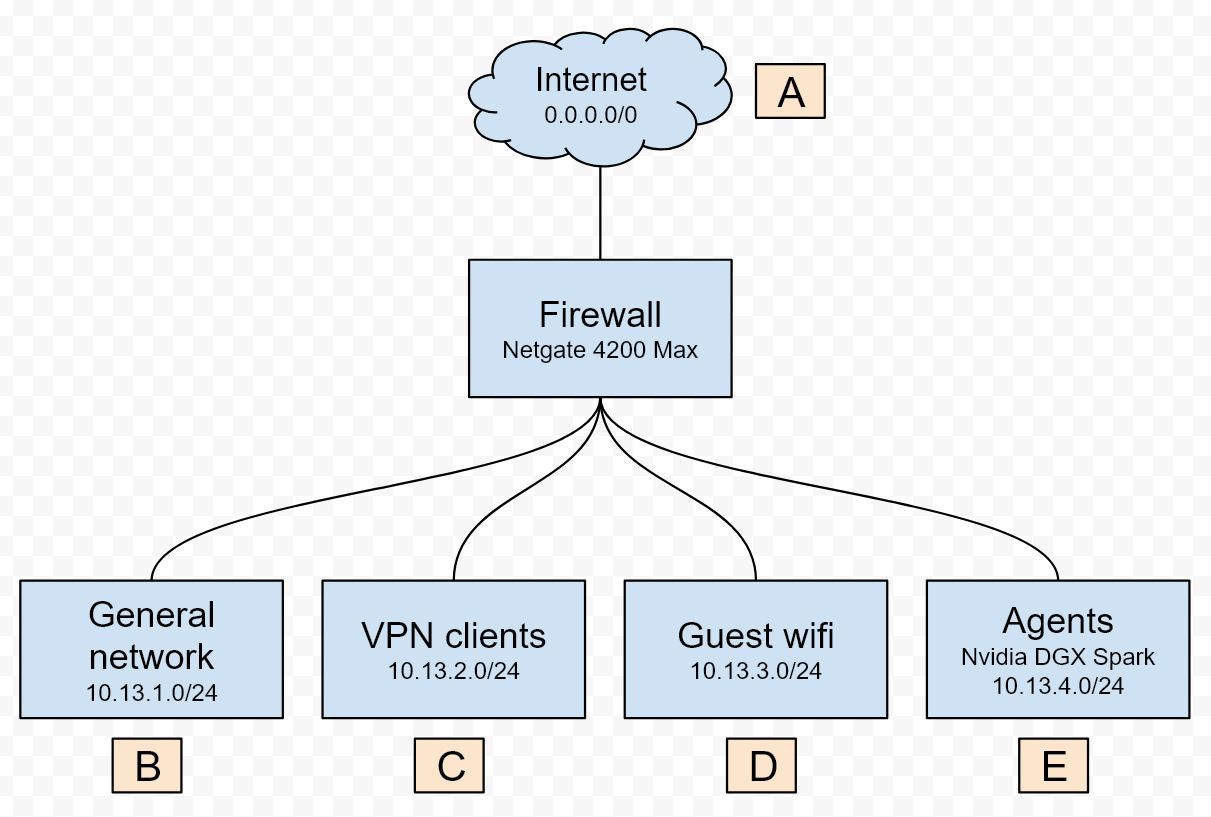
The DGX Spark is deployed on its own VLAN, separate from the general network, guest wifi, and VPN client VLANs. Traffic from VLAN B and C is allowed to flow to VLAN E to administer the agents. VLAN E is not allowed to flow traffic to any network segment other than the internet (A), and even this is an allowlist of domain names and IP ranges. (I've seen Claude Code work around a pure DNS block, it's just not a strong enough control) Keep the agents separate and isolated to the work context they have.
This at least gives some confidence that from a network layer the agentics cant be exposed to something they shouldn't on the internet at large, and have zero access to my actual network.