
Undervolt your devices
I am relatively late to the undervolting game but its fun and worth it
08/24/2026

I was pretty late to the undervolting game, my first exposure was with the Steam Deck. When the OLED Deck was launched I bought one and quickly learned undervolting would improve battery life / performance. Improvements were definitely subtle but given games often run kind of on the razors edge of "playable" it was worth the modest effort. You pop into the BIOS, set an offset, try your favorite game. If it crashes, scale it back, if not you're good to go.
I had tried the same on my 2020-era PC gear with pretty modest success. Both of my 3090s didn't undervolt particularly well, and my Intel 10th gen CPU didn't really either. (Getting rid of the pair of 3090s dropped my home office temperatures from 28C to 26C on their own!) After my recent round of PC updates things had become much more viable on the undervolting front. Both modern Intel CPUs and Nvidia Blackwell GPUs undervolt very well. My GPU is able to maintain its stock "OC" performance with a 20% power savings, and my CPU is able to outperform it's stock performance (by 1000 on the multi-core Cinebench!) with a whopping 22% power savings. Non-trivial improvements to the heat dumped into my office, and this is all with balmy summer 25C ambient office temperatures.
Why do chips need to be undervolted is the big question most people ask. Well in order to deliver stable performance at financially acceptable yields chips are driven pretty hard from the factory. Every chip is a little different and voltages are essentially worst case performance. Additionally chips that are hot require more voltage and you don't know how well the customer will cool everything. Tiny stock coolers that are poorly setup are going to perform very differently than a big air or water cooling setup.
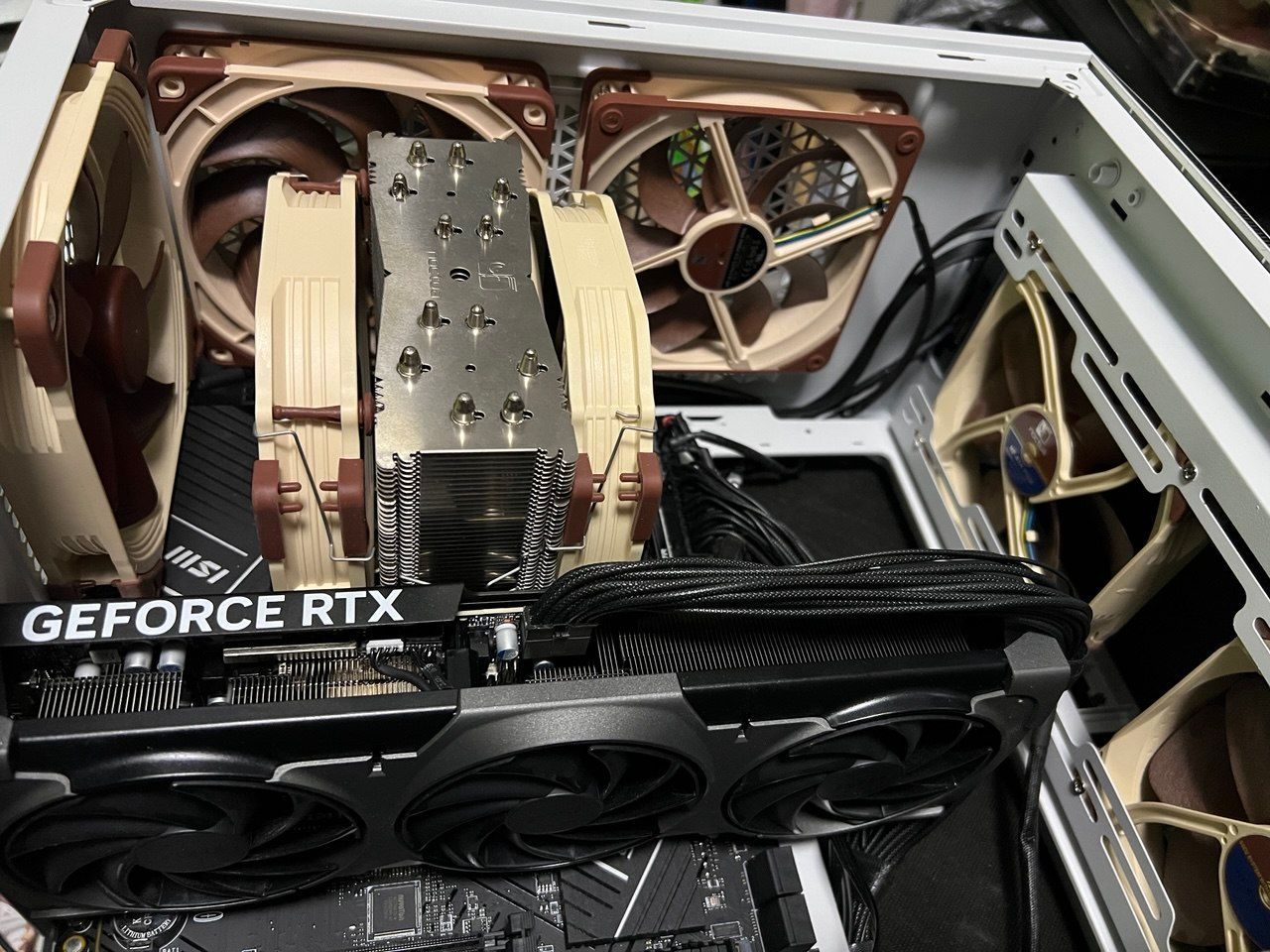
I've given Noctua's recommended top exhaust / intake staggered setup a go and it does indeed improve thermals, overall 3 in 2 out with static speeds dialed in
Of course with how much competition there is for semiconductor wafer space yields are more important than ever. Bleeding edge nodes are expensive! Intel, AMD, Nvidia, etc don't want to waste any chips that could hit their stated performance just to save some power and heat. Your luck with undervolting is a bit of... luck. Some chips are going to undervolt a little, some a lot. This is the silicon lottery. Buying better binned versions of chips helps your odds, i.e. the factory "OC" versions of GPUs may contain better bins. For Intel these are going to be the K and KF versions of processors, and with AMD its typically its X / XT / X3D versions.
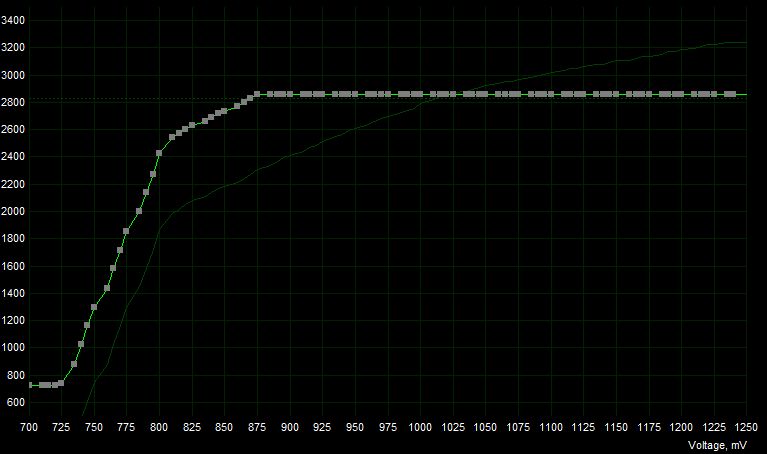
So how do you go about undervolting your gear? Well for GPUs its pretty easy, you download MSI Afterburner and watch one of the 2000+ Youtube tutorials on how to setup a curve and save it to that it applies on system reboot. Essentially pick a target clock rate and voltage and flatten the curve beyond that point. Test it with your favorite benchmark (3DMark seems to work fine) and watch power usage as you go. If it crashes you've gone too far. Scale it back and re-benchmark. The GB203 twins (5070ti/5080) seem to run well at 2800mhz/875mV or better, I stably run 2850/870mV with massive power savings.
CPUs are a little more of a pain. Each motherboard has its own way to do it, most require a full reboot between iterations. MSI seems to be pretty easy with their "CPU Lite Load" settings. Set the "mode" to something lower than stock (aka the auto mode, which it will tell you what it selected) and run a benchmark. Cinebench R23 is the sort of standard here. In Intel land crashes aren't likely here, but if the score takes a dive you've pushed it too hard and the system is pulling clock cycles (essentially no-op'ing) to prevent a crash. You can disable this voltage mismatch protection but it wasn't something I had to do to get significant savings at better than stock performance. Run something like HWMonitor or HWInfo64 to watch achieved clocks while you benchmark, requested power vs delivered power, and overall temperature. I've managed -200mV on a KF processor with above stock performance in lengthy Cinebench R23 runs, with sustained temperatures 79-81C. Meanwhile "desktop use" temperatures are around 35C and "idle" around 31C, all with a 25C ambient temp in the room.
I kind of find this tinkering fun, and avoiding my computer using absolutely mental amounts of juice in the summer is appreciated.